

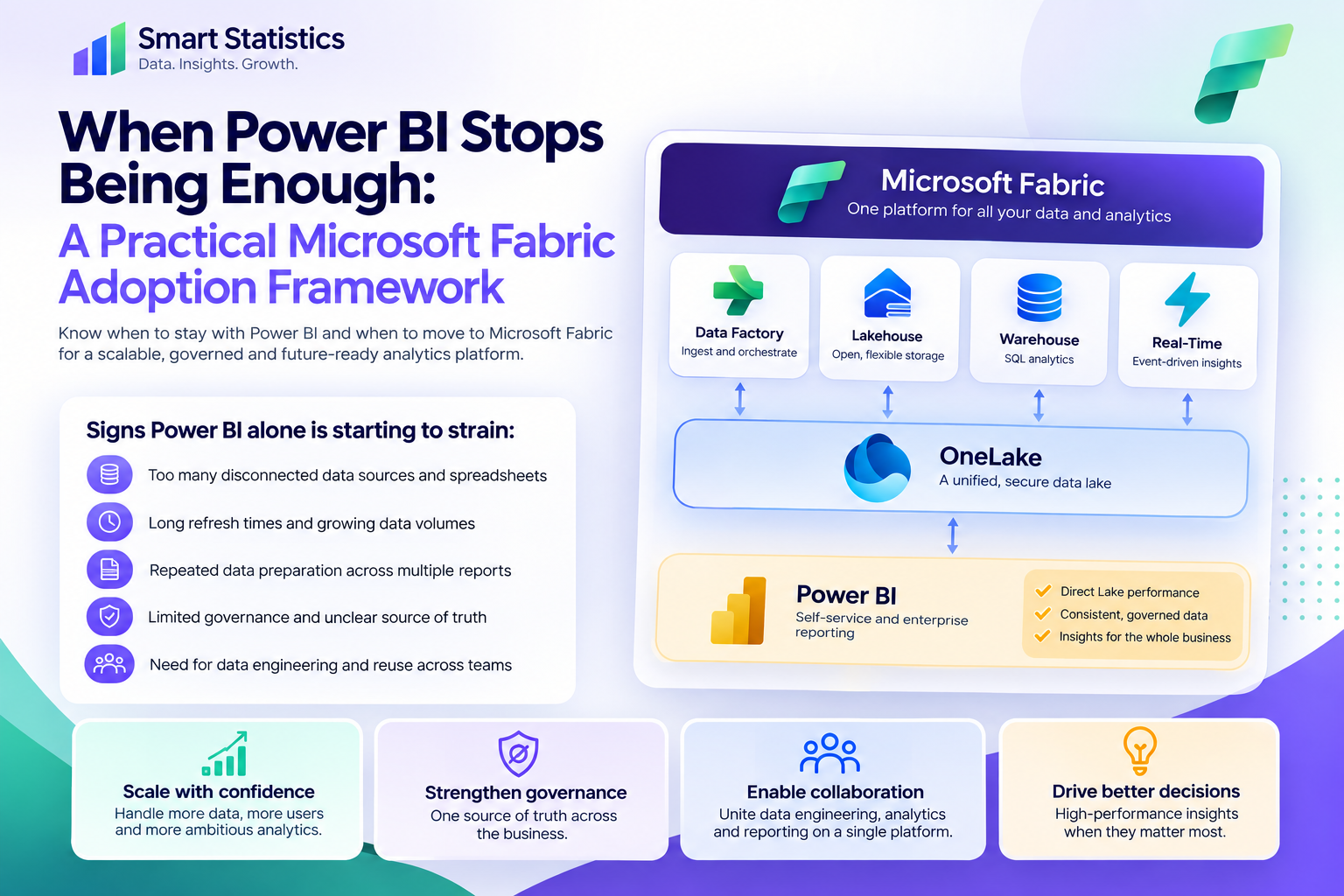
When Power BI Stops Being Enough: A Practical Microsoft Fabric Adoption Framework
Power BI can take a business a long way. Many organisations can build excellent reporting by connecting Power BI to SQL, Excel, SharePoint, APIs and operational systems without introducing a larger analytics platform.
The question is not whether Microsoft Fabric is newer or more capable. The useful question is whether your current reporting architecture is creating enough duplication, refresh pressure, data-engineering overhead or governance risk that a shared analytics platform now solves a genuine business problem.
Power BI Is Not the Problem — the Surrounding Data Process Might Be
Most organisations do not need to replace Power BI. The usual trigger for Fabric is that the work around Power BI has become fragmented, duplicated or difficult to operate.
Too Many Independent Pipelines
Different reports repeatedly ingest and transform the same operational data with separate logic.
- Repeated Power Query work
- Different definitions of the same field
- Multiple refresh schedules for duplicate data
Refresh Is Becoming a Bottleneck
Larger models, longer histories and more frequent delivery requirements are making full import cycles harder to manage.
- Long refresh windows
- Growing data volumes
- Pressure for lower latency
Files Have Become Infrastructure
Business-critical reporting depends on chains of copied CSVs, departmental spreadsheets and manually managed extracts.
- Unclear lineage
- Manual hand-offs
- Fragile ownership
Governance Is Hard to See
Data ownership, storage, access and transformation rules are spread across workbooks, models and personal processes.
- Unclear source of truth
- Duplicated sensitive data
- Difficult change control
Move from a Reporting Toolchain to a Shared Analytics Platform
Microsoft Fabric brings several analytics workloads into one SaaS environment built around OneLake, allowing ingestion, engineering, warehousing and Power BI to work on a shared storage foundation.
OneLake
A unified logical data lake used across Fabric workloads rather than a separate storage layer for every analytical service.
Lakehouse
Flexible storage for files and Delta tables with Spark and SQL access for engineering and analytics.
Warehouse
SQL-first relational analytics for structured reporting, dimensional models and T-SQL development.
Data Factory
Data movement, orchestration and transformation capabilities for bringing sources into a managed analytical process.
Direct Lake
A Power BI semantic model storage mode designed to work directly with Delta tables in OneLake without the traditional full import-copy pattern.
When to Stay with Power BI — and When Fabric Starts to Make Sense
Fabric is not automatically better for every reporting solution. Use the architecture that matches the actual complexity and value of the business problem.
| Situation | Power BI-Centred Approach | Fabric May Add Value When... |
|---|---|---|
| Data volume | Import models remain manageable and refresh within an acceptable business window. | Historical data is large, reused widely or difficult to reload repeatedly into separate models. |
| Data engineering | Power Query and a small number of source queries provide sufficient transformation. | The business needs orchestrated pipelines, notebooks, reusable engineering layers or shared transformations. |
| Storage | Source systems remain the reliable home for analytical data. | The organisation needs a shared analytical storage layer or wants to reduce repeated copies across solutions. |
| Teams | A small BI team can manage source connections, models and reports coherently. | Data engineers, analysts, SQL developers and BI teams need to work on the same governed analytical estate. |
| Latency | Scheduled refresh provides data frequently enough for decisions. | The business needs lower-latency analytics on Fabric-managed data and a Direct Lake pattern is technically appropriate. |
| Governance | Existing source, workspace and semantic-model controls are clear and supportable. | Data duplication, unclear ownership and fragmented transformations are creating operational or control risk. |
Introduce Fabric in Controlled Stages
A good adoption programme starts with the constraint you need to solve, then introduces only the Fabric components required for that use case.
Document the current pain, not the desired technology
Start by describing what is difficult today. For example: several teams create separate transformations from the same ERP extract, refresh takes too long, or historical data must be loaded repeatedly into several semantic models.
- Where is data duplicated?
- Which process takes too long?
- Which failure is recurring?
- What decision is being delayed?
Map the existing analytical estate
List the important data sources, transformation jobs, files, Power BI semantic models, refresh schedules and business owners.
This often exposes repeated data movement and transformation work that individual reporting projects have accumulated over time.
Choose the storage pattern deliberately
Fabric provides different storage experiences for different workloads. A Lakehouse is a strong fit for flexible data engineering and Delta-based data, while a Warehouse is a strong fit for structured relational analytics and SQL-first teams.
Centralise one valuable data flow first
Pick a use case where several reports reuse the same source data. Ingest and prepare that data once, then allow downstream analytics to consume the curated result.
- Choose a repeatable source
- Define a curated analytical layer
- Document transformations
- Reconcile the output to the current source
Keep Power BI as the business-facing semantic layer
Moving to Fabric does not mean abandoning Power BI. Power BI remains the reporting and semantic-model layer for many Fabric solutions.
Where the model and Fabric data design support it, Direct Lake can provide a different storage approach from traditional Import by working directly with Delta tables in OneLake.
Define governance before scaling the platform
Decide who can create workspaces, own pipelines, manage access, publish curated data and change production items before dozens of Fabric assets appear.
- Workspace strategy
- Environment separation
- Data ownership
- Security and access review
- Naming and deployment standards
Measure whether the pilot actually improved the process
Compare the new solution against the previous baseline. A Fabric pilot is successful when it improves an important operational measure — not simply when the technology works.
- Refresh or processing duration
- Number of duplicated transformations removed
- Manual support effort
- Time to deliver a new analytical use case
- Data-quality or lineage visibility
Start with One Reusable Data Domain
The example below is illustrative only, but it shows the type of use case that can expose the value of a shared Fabric data layer without attempting an organisation-wide migration.
Example: shared sales and margin data
Imagine four Power BI reports independently extracting the same sales, customer and product data from an ERP system. Each report contains slightly different Power Query logic and refreshes at a different time.
A Fabric pilot could ingest the source once with Data Factory, curate reusable analytical tables in a Lakehouse or Warehouse, and allow several Power BI semantic models to consume that shared layer.
The potential benefit is not automatically faster dashboards. The more important improvement may be one governed transformation path, fewer duplicated source queries and a clearer place to manage business logic.
Fabric Reduces Some Complexity — It Does Not Remove Ownership
A unified platform can still become fragmented if every team creates its own workspaces, shortcuts, pipelines and curated tables without common standards.
Ownership
Assign accountable owners for source systems, pipelines, curated data products, semantic models and business definitions.
Access
Design workspace and data access around job requirements rather than broad convenience permissions.
Standards
Define naming, environment, deployment, documentation and change-control conventions before the platform grows.
Capacity
Monitor workload behaviour and capacity consumption so engineering, SQL and Power BI workloads do not compete without visibility.
Microsoft Fabric Adoption FAQs
Do we need Microsoft Fabric if Power BI already works?
What does OneLake actually change?
Should we choose a Lakehouse or Warehouse?
Does Fabric replace Power BI?
What is Direct Lake?
Can we start small?
Does Fabric eliminate duplicated data?
How can Smart Statistics help?
Technical references
This article is aligned with Microsoft Fabric documentation. Product capabilities, capacity requirements and licensing can change, so validate current Microsoft guidance before a production rollout.
Is Your Reporting Estate Ready for a Shared Data Platform?
Smart Statistics helps UK businesses decide when Microsoft Fabric is genuinely useful — and when a simpler Power BI-centred architecture is still the better choice.
We can review your existing reporting landscape, identify duplicated data processes, design a Fabric pilot and build a governed path from source systems through engineering, storage and Power BI.