
Smart Statistics · SQL practical tutorial
Stop SQL Joins Inflating Your Reports: A Practical Reconciliation Tutorial
A report can refresh successfully and still overstate its totals. Learn how to combine invoices and payments without counting the same invoice twice.
By Smart Statistics · · SQL Server and Azure SQL
The reconciliation desk
Illustrative example · fictional GBP dataSame invoices, different calculations
Illustrative example · all chart figuresInputs and release status
Invoice register → one row per invoice
Payment allocations → multiple rows per invoice
Naïve query → hold for investigation
Corrected query → reconcile before release
This editorial dashboard is an illustrative example, not a live Microsoft interface or a client result.
The hidden cost of a valid join
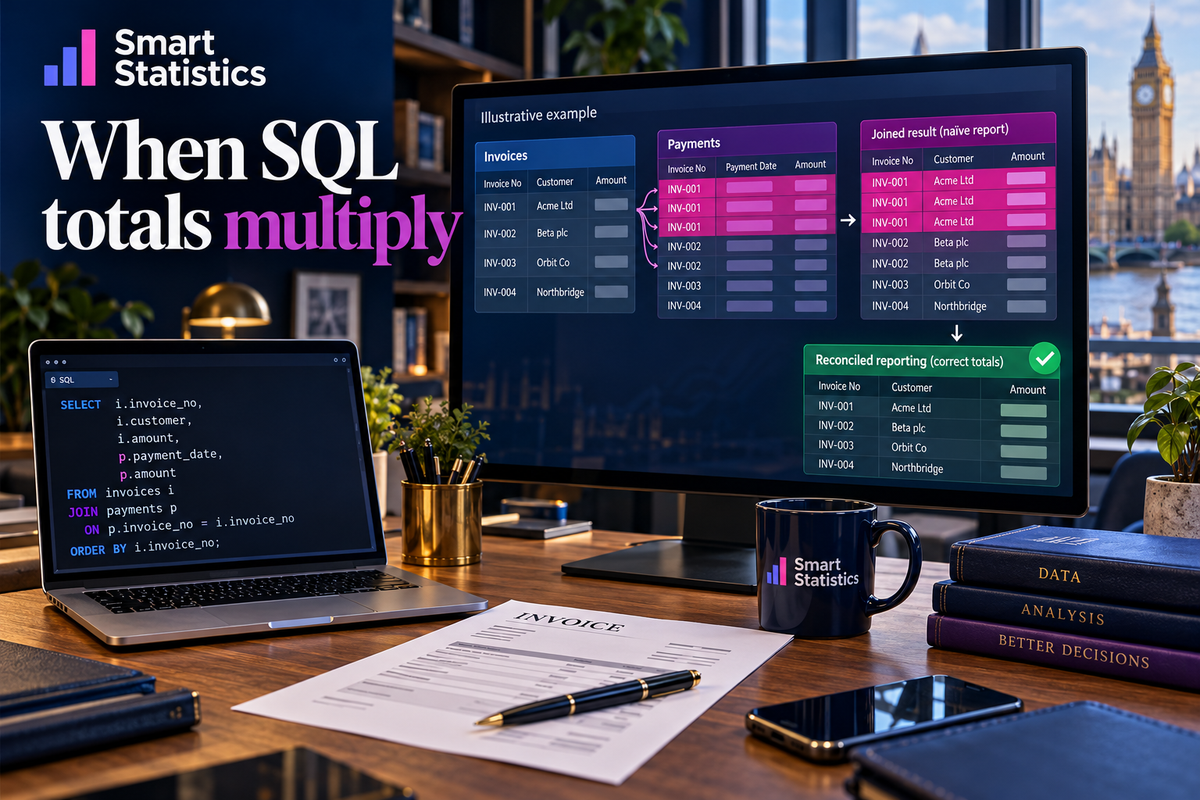
A UK services company combines its invoice register with payment allocations to show what customers owe. One invoice has two instalments. The join returns two rows for that invoice, and the report sums its full value twice. Managers may chase the wrong balance or spend hours explaining a variance that the source system never had.
The payment records are legitimate. The mistake is summing an invoice-level amount at payment-level detail. SQL has followed the matching rules correctly; the reporting design has changed what one row represents.
Define the grain
Write “one row per invoice” before writing the query. An invoice total belongs to that level; each payment belongs to a different level.
Preserve the population
Unpaid invoices must remain visible. A left join retains them, but does not prevent multiplication where several payments match.
Prove the result
Reconcile row counts, invoice amounts and allocated payments. A plausible grand total alone is not enough.
Set up a controlled exercise
Use SQL Server Management Studio or another T-SQL query editor connected to SQL Server or Azure SQL Database. Open a new query and run the complete batch below in one execution. It uses table variables and does not change permanent business tables. Keep all statements together: the variables exist only within this batch.
The fictional amounts are GBP invoice balances and allocations on the same basis. This exercise excludes credit notes, tax breakdowns, currency conversion, dates and unapplied cash. It teaches join correctness, not a complete accounting ledger.
| Invoice | Value | Allocated payments |
|---|---|---|
| 101 | £1,000 | £400 and £600 |
| 102 | £1,000 | £250 |
| 103 | £600 | None |
Run the complete worked example
Results A and B expose the error. C creates one payment total per invoice before joining. D checks totals and counts, E checks for unmatched payments, and F produces the customer summary. Microsoft documents the underlying LEFT JOIN, GROUP BY and SUM behaviour in the sources below.
-- Illustrative example: run this complete batch in SQL Server or Azure SQL.
-- Table variables keep the exercise separate from permanent business tables.
DECLARE @Invoices TABLE (
    InvoiceID int PRIMARY KEY,
    Customer nvarchar(80) NOT NULL,
    InvoiceAmount decimal(12,2) NOT NULL
);
DECLARE @Payments TABLE (
    PaymentID int PRIMARY KEY,
    InvoiceID int NOT NULL,
    PaymentAmount decimal(12,2) NOT NULL
);
INSERT INTO @Invoices VALUES
    (101, N'Leicester Services', 1000.00),
    (102, N'Leicester Services', 1000.00),
    (103, N'Midlands Supply', 600.00);
INSERT INTO @Payments VALUES
    (1, 101, 400.00),
    (2, 101, 600.00),
    (3, 102, 250.00);

-- A: inspect the multiplication; invoice 101 appears twice.
SELECT i.InvoiceID, i.InvoiceAmount, p.PaymentID, p.PaymentAmount
FROM @Invoices AS i
LEFT JOIN @Payments AS p ON p.InvoiceID = i.InvoiceID
ORDER BY i.InvoiceID, p.PaymentID;

-- B: demonstrate two incorrect invoice totals.
SELECT SUM(i.InvoiceAmount) AS InflatedTotal,
       SUM(DISTINCT i.InvoiceAmount) AS IncorrectDistinctTotal
FROM @Invoices AS i
LEFT JOIN @Payments AS p ON p.InvoiceID = i.InvoiceID;

-- C: aggregate the child records to one row per invoice before joining.
DECLARE @Report TABLE (
    InvoiceID int PRIMARY KEY,
    Customer nvarchar(80) NOT NULL,
    InvoiceAmount decimal(12,2) NOT NULL,
    PaidAmount decimal(38,2) NOT NULL
);
WITH PaymentTotals AS (
    SELECT InvoiceID, SUM(PaymentAmount) AS PaidAmount
    FROM @Payments
    GROUP BY InvoiceID
)
INSERT INTO @Report
SELECT i.InvoiceID, i.Customer, i.InvoiceAmount,
       COALESCE(p.PaidAmount, 0)
FROM @Invoices AS i
LEFT JOIN PaymentTotals AS p ON p.InvoiceID = i.InvoiceID;

SELECT InvoiceID, Customer, InvoiceAmount, PaidAmount,
       InvoiceAmount - PaidAmount AS OutstandingAmount
FROM @Report
ORDER BY InvoiceID;

-- D: reconcile both population and money; all differences should be zero.
SELECT
    (SELECT COUNT(*) FROM @Report)
      - (SELECT COUNT(*) FROM @Invoices) AS RowDifference,
    (SELECT COALESCE(SUM(InvoiceAmount), 0) FROM @Report)
      - (SELECT COALESCE(SUM(InvoiceAmount), 0) FROM @Invoices)
      AS InvoiceDifference,
    (SELECT COALESCE(SUM(PaidAmount), 0) FROM @Report)
      - (SELECT COALESCE(SUM(PaymentAmount), 0) FROM @Payments)
      AS PaymentDifference;

-- E: identify child records that have no matching invoice.
SELECT p.PaymentID, p.InvoiceID
FROM @Payments AS p
LEFT JOIN @Invoices AS i ON i.InvoiceID = p.InvoiceID
WHERE i.InvoiceID IS NULL;

-- F: publish the reconciled customer summary.
SELECT Customer, COUNT(*) AS InvoiceCount,
       SUM(InvoiceAmount) AS Invoiced,
       SUM(PaidAmount) AS Paid,
       SUM(InvoiceAmount - PaidAmount) AS Outstanding
FROM @Report
GROUP BY Customer
ORDER BY Customer;
Read the outputs before changing a report
Inspect the expanded rows
In result A, invoice 101 appears twice. Invoice 103 remains, with NULL payment fields. Result B returns £3,600 for the ordinary sum and £1,600 for SUM(DISTINCT). Both are wrong; the source total is £2,600. All figures are illustrative examples.
Check the corrected detail
Result C returns one row per invoice. Outstanding amounts are £0, £750 and £600. COALESCE converts a missing payment total to zero only after the aggregate. These are illustrative example results.
Read the reconciliation
Result D should show zero for all three differences; result E should return no rows. The report table’s primary key also rejects repeated invoice IDs. Investigate any failure rather than hiding it in a visual.
Check the business summary
Result F shows Leicester Services invoiced £2,000, paid £1,250, outstanding £750; Midlands Supply invoiced £600, paid £0, outstanding £600. These are illustrative examples, not customer results.
Adapt the pattern to real reporting
Agree the key. Invoice numbers may repeat across companies. Use the actual unique identifier, or the full company-and-invoice key, consistently in grouping, joins and reconciliation. Investigate missing keys before release. If one receipt covers several invoices, use its allocation records rather than joining the entire receipt value to every invoice.
Define the reporting date. A period’s new invoices and the balance outstanding at a date are different questions. For an as-at balance, agree which invoices and allocations existed by the cut-off. Filter payments inside their aggregation so invoices with no eligible payment remain visible. Applying a payment-date condition in the final WHERE clause can remove unmatched invoices.
Keep amounts comparable. Reconcile by currency and legal entity. Agree gross or net treatment, reversals and credit notes with finance. Do not sum GBP and EUR together or silently clamp negative balances to zero. In production, COALESCE is appropriate for an absent allocation total only when that absence genuinely means no allocated payment; it must not disguise a missing source extract.
Handle additional child tables separately. Invoice lines and payments can multiply each other if both are joined raw. Aggregate each to the intended report key first. If line-level analysis is required, retain that separate grain and define an allocation rule for invoice-level measures.
Make reconciliation an operating control
Finance owns the definition
The finance owner approves the population, cut-off, currency and balance rules. Keep a signed comparison against the source ledger, including invoices with no payments and unusual allocations.
The data owner owns the gate
Automate duplicate-key, orphan-payment and amount checks. Compare the same source snapshot: records changing between extracts can create a false difference. Set tolerances explicitly; do not invent a rounding allowance to make a failed check pass.
The report owner owns adoption
Run the corrected output beside the existing report for an agreed close cycle. Explain changed balances to users, update report definitions and retire superseded exports after approval. Keep a rollback route.
Support owns exceptions
Assign failures to a named owner and deputy. Record which extract, key and control failed. Restrict financial detail to authorised users and keep diagnostic samples proportionate.
Decide whether the report is ready
Release when each invoice has the intended representation, source and report totals reconcile on the same basis, exceptions are resolved or explicitly accepted, and finance approves the output. Hold when totals differ, source completeness is uncertain or key uniqueness is unproven.
Track unexplained monetary variance, unmatched allocations, repeated report keys and reconciliation effort per close. Also track query duration at representative volumes: a logically correct example does not establish production performance. Review indexes and execution plans with the database owner.
The immediate benefit is a defensible balance. Any time saving should be measured against the team’s actual reconciliation work; correcting an inflated report does not itself create cash or additional revenue.
Your join release checklist
Questions teams ask
Does a LEFT JOIN prevent duplicated totals?
No. It preserves unmatched rows from the left table, but a left-hand row still appears once for every matching right-hand row.
Why not use SUM(DISTINCT InvoiceAmount)?
It removes repeated amounts, not repeated invoice identities. Two legitimate invoices for the same amount would be counted only once.
Should every repeated invoice ID be deleted?
No. Several payments against one invoice are valid child records. Investigate duplicate business events separately; do not delete legitimate instalments.
Can this result feed Power BI?
Yes. Use the reconciled invoice-level output as a reporting source after validating refresh, permissions and the model relationships. Avoid joining it back to raw payment rows and summing invoice amounts again.
Make your totals stand up to scrutiny.
Bring one disputed report and the source totals behind it. Smart Statistics can help review SQL joins, define reconciliation controls and build reporting your team can explain.