

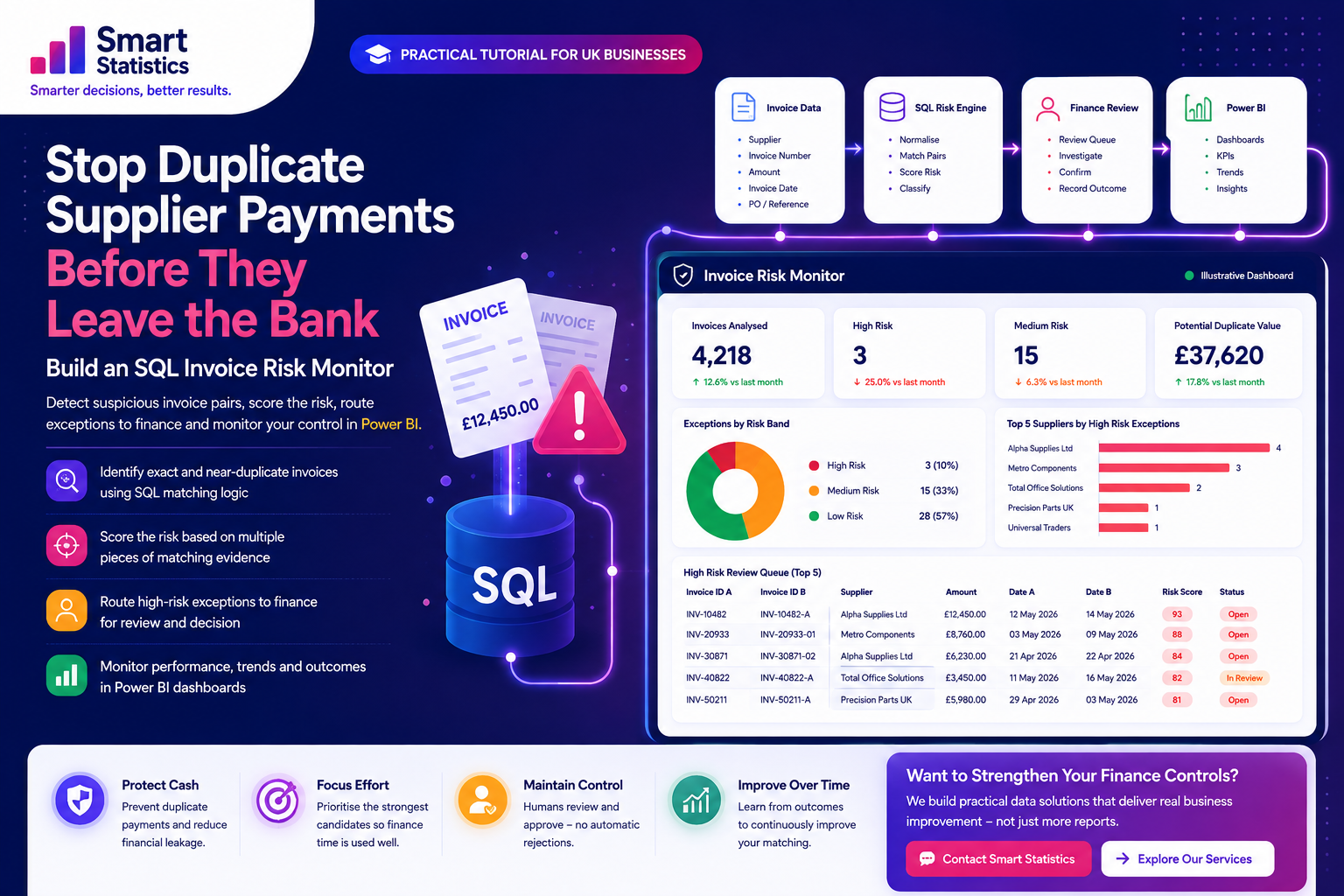
Stop Duplicate Supplier Payments Before They Leave the Bank
Duplicate payments are rarely as simple as finding two completely identical records.
The same supplier invoice can arrive twice with a slightly different reference, a changed date, extra spaces, a missing prefix or a manual re-entry.
In this tutorial, we will build an SQL-based invoice risk monitor that identifies suspicious pairs, assigns a risk score and sends the highest-risk exceptions to finance for review.
Exceptions by Risk Band
Illustrative candidate pairsFinance Review Queue
Highest-risk candidates firstDuplicate Invoices Rarely Look Perfectly Identical
An exact duplicate query is useful, but finance controls become much stronger when you also look for combinations of matching evidence.
Exact Re-entry
The same supplier, invoice number, amount and date are entered twice. This is the easiest duplicate to detect.
Reference Variation
INV-10482, INV10482 and 10482 may refer to the same supplier document even though the raw text is different.
Date Movement
A duplicate can be entered days later, making a simple same-date check too restrictive.
Legitimate Similarity
Recurring suppliers can issue invoices with the same amount every month. Matching values alone do not prove duplication.
Build a Detection Process, Not Just a Query
Invoice Data
Supplier, invoice number, amount, date and reference fields.
Normalise
Standardise references before comparing records.
Pair Match
Compare plausible invoice candidates rather than every possible pair.
Risk Score
Combine several pieces of matching evidence.
Finance Review
Investigate high-risk exceptions and record the outcome.
Build the Monitor Step by Step
The SQL examples below use T-SQL-style syntax suitable for SQL Server and Azure SQL patterns. Adapt field names and functions to your own platform.
Start with a reliable invoice table
Your matching process needs stable invoice-level fields. A useful starting structure might include:
- InvoiceID
- SupplierID
- InvoiceNumber
- InvoiceDate
- InvoiceAmount
- PurchaseOrderNumber
- PaymentReference
- CreatedDateTime
- PaymentStatus
CREATE TABLE dbo.SupplierInvoice
(
    InvoiceID            bigint          NOT NULL PRIMARY KEY,
    SupplierID           int             NOT NULL,
    InvoiceNumber        nvarchar(100)   NULL,
    InvoiceDate          date            NOT NULL,
    InvoiceAmount        decimal(18,2)   NOT NULL,
    PurchaseOrderNumber  nvarchar(100)   NULL,
    PaymentReference     nvarchar(100)   NULL,
    CreatedDateTime      datetime2       NOT NULL,
    PaymentStatus        nvarchar(30)    NULL
);
Normalise invoice references before matching
Differences such as spaces, dashes and character case should not automatically prevent two otherwise similar invoice references from being compared.
SELECT
    InvoiceID,
    SupplierID,
    InvoiceNumber,

    UPPER(
        REPLACE(
            REPLACE(
                REPLACE(
                    LTRIM(RTRIM(InvoiceNumber)),
                    ' ',
                    ''
                ),
                '-',
                ''
            ),
            '/',
            ''
        )
    ) AS NormalisedInvoiceNumber,

    InvoiceDate,
    InvoiceAmount,
    PurchaseOrderNumber

FROM dbo.SupplierInvoice;
Examples:
INV-10482   → INV10482
INV 10482   → INV10482
inv/10482   → INV10482
Find the strongest duplicate candidates
Start with pairs that match on supplier, amount and normalised invoice number.
WITH InvoiceBase AS
(
    SELECT
        InvoiceID,
        SupplierID,
        InvoiceDate,
        InvoiceAmount,
        PurchaseOrderNumber,

        UPPER(
            REPLACE(
                REPLACE(
                    REPLACE(
                        LTRIM(RTRIM(InvoiceNumber)),
                        ' ',
                        ''
                    ),
                    '-',
                    ''
                ),
                '/',
                ''
            )
        ) AS NormalisedInvoiceNumber

    FROM dbo.SupplierInvoice
)

SELECT
    A.InvoiceID AS InvoiceID_A,
    B.InvoiceID AS InvoiceID_B,
    A.SupplierID,
    A.NormalisedInvoiceNumber,
    A.InvoiceAmount,
    A.InvoiceDate AS InvoiceDate_A,
    B.InvoiceDate AS InvoiceDate_B

FROM InvoiceBase A

INNER JOIN InvoiceBase B
    ON  A.SupplierID = B.SupplierID
    AND A.NormalisedInvoiceNumber = B.NormalisedInvoiceNumber
    AND A.InvoiceAmount = B.InvoiceAmount
    AND A.InvoiceID < B.InvoiceID;
The final condition is important:
A.InvoiceID < B.InvoiceID
It prevents the same pair appearing twice as A/B and B/A, and prevents an invoice matching itself.
Extend the search to near duplicates
Exact matching will miss cases where the same invoice has been entered with a slightly different reference or date.
Create a broader candidate set using conditions such as:
- Same SupplierID
- Same InvoiceAmount
- Invoice dates within a defined window
- Same purchase order
- Same or similar normalised invoice reference
SELECT
    A.InvoiceID AS InvoiceID_A,
    B.InvoiceID AS InvoiceID_B,

    A.SupplierID,
    A.InvoiceAmount,

    A.InvoiceDate AS InvoiceDate_A,
    B.InvoiceDate AS InvoiceDate_B,

    ABS(
        DATEDIFF(
            day,
            A.InvoiceDate,
            B.InvoiceDate
        )
    ) AS DateDifferenceDays

FROM dbo.SupplierInvoice A

INNER JOIN dbo.SupplierInvoice B
    ON  A.SupplierID = B.SupplierID
    AND A.InvoiceAmount = B.InvoiceAmount
    AND A.InvoiceID < B.InvoiceID

WHERE
    ABS(
        DATEDIFF(
            day,
            A.InvoiceDate,
            B.InvoiceDate
        )
    ) <= 14;
Score the evidence instead of using one rule
A weighted score makes it easier to distinguish a weak coincidence from a very strong duplicate candidate.
An illustrative weighting model could be:
- Same supplier: 20 points
- Same amount: 25 points
- Same normalised invoice number: 35 points
- Invoice dates within seven days: 10 points
- Same purchase order: 10 points
SELECT
    A.InvoiceID AS InvoiceID_A,
    B.InvoiceID AS InvoiceID_B,

    (
        CASE
            WHEN A.SupplierID = B.SupplierID
            THEN 20
            ELSE 0
        END
        +
        CASE
            WHEN A.InvoiceAmount = B.InvoiceAmount
            THEN 25
            ELSE 0
        END
        +
        CASE
            WHEN A.NormalisedInvoiceNumber =
                 B.NormalisedInvoiceNumber
            THEN 35
            ELSE 0
        END
        +
        CASE
            WHEN ABS(
                DATEDIFF(
                    day,
                    A.InvoiceDate,
                    B.InvoiceDate
                )
            ) <= 7
            THEN 10
            ELSE 0
        END
        +
        CASE
            WHEN A.PurchaseOrderNumber =
                 B.PurchaseOrderNumber
            THEN 10
            ELSE 0
        END
    ) AS RiskScore

FROM InvoiceBase A

INNER JOIN InvoiceBase B
    ON  A.SupplierID = B.SupplierID
    AND A.InvoiceID < B.InvoiceID;
You could then translate the score into bands:
CASE

    WHEN RiskScore >= 80
        THEN 'High'

    WHEN RiskScore >= 55
        THEN 'Medium'

    ELSE 'Low'

END AS RiskBand
Persist a finance review queue
Do not force analysts to rerun a query and remember what they reviewed yesterday.
Create a controlled exception table containing:
- CandidatePairID
- InvoiceID_A
- InvoiceID_B
- RiskScore
- RiskBand
- DetectedDateTime
- ReviewStatus
- ReviewedBy
- ReviewedDateTime
- ReviewOutcome
- ReviewComment
CREATE TABLE dbo.InvoiceRiskQueue
(
    CandidatePairID     bigint IDENTITY PRIMARY KEY,

    InvoiceID_A         bigint NOT NULL,
    InvoiceID_B         bigint NOT NULL,

    RiskScore           int NOT NULL,
    RiskBand            nvarchar(20) NOT NULL,

    DetectedDateTime    datetime2 NOT NULL,

    ReviewStatus        nvarchar(30) NOT NULL,
    ReviewedBy          nvarchar(200) NULL,
    ReviewedDateTime    datetime2 NULL,

    ReviewOutcome       nvarchar(50) NULL,
    ReviewComment       nvarchar(1000) NULL
);
Put the control under Power BI oversight
Once the review queue exists, Power BI can tell management whether the control is operating effectively.
Useful measures include:
Flagged Invoice Pairs =
COUNTROWS(
    'Invoice Risk Queue'
)
High Risk Pairs =
CALCULATE(
    [Flagged Invoice Pairs],
    'Invoice Risk Queue'[RiskBand] = "High"
)
Open Reviews =
CALCULATE(
    [Flagged Invoice Pairs],
    'Invoice Risk Queue'[ReviewStatus] = "Open"
)
Confirmed Duplicate Pairs =
CALCULATE(
    [Flagged Invoice Pairs],
    'Invoice Risk Queue'[ReviewOutcome]
        = "Confirmed Duplicate"
)
You can then analyse risk by supplier, reviewer, month, business entity, category or payment status.
Test an Illustrative Invoice Pair
Toggle the matching evidence below to see how a weighted review score can prioritise finance exceptions.
Matching Evidence
Select the characteristics shared by the two invoices.
Illustrative Risk Result
This score is a prioritisation tool, not proof of duplication.
Don't Just Find Duplicates — Measure the Control
Power BI can show whether suspicious invoices are being reviewed quickly and whether particular suppliers or processes repeatedly create exceptions.
Risk Trend
Track high-, medium- and low-risk candidate pairs over time.
Supplier Concentration
Identify suppliers generating unusually high numbers of review cases.
Review Ageing
Monitor how long finance exceptions remain unresolved.
Model Precision
Compare confirmed duplicates with false positives to improve matching rules.
The Algorithm Flags Risk. Finance Makes the Decision.
A technically sophisticated matching model can still become a poor business control if ownership, review and audit evidence are missing.
Named Ownership
Define who reviews high-risk invoice candidates and who owns unresolved exceptions.
Audit Evidence
Record who reviewed each candidate, the decision, the date and the supporting comment.
Human Verification
Treat the model as a risk detector rather than automatic proof that a payment is invalid.
Continuous Calibration
Use confirmed outcomes to tune score thresholds, weights and supplier-specific rules.
SQL Duplicate Invoice FAQs
Can SQL automatically find duplicate invoices?
Why not just check invoice number and supplier?
Should the SQL query automatically stop payment?
What risk score should we use?
Can this work with Excel invoice data?
Can Power Automate be added?
What should Power BI show?
How can Smart Statistics help?
Your Finance Team Shouldn't Have to Discover a Duplicate After the Payment Has Already Gone.
Smart Statistics helps UK businesses turn operational data into practical controls using SQL, Power BI, Power Apps, Power Automate and Microsoft Fabric.
The objective is not another dashboard. It is a better process: identify risk earlier, focus human attention where it matters and retain evidence of the decisions made.