

SQL data quality checks: build a pre-refresh gate for Power BI
A successful refresh only proves that data moved. Build a reusable T-SQL control that tests each batch, preserves evidence and prevents a known critical failure from becoming tomorrow’s dashboard.
1 October 2026 · For UK data, finance, operations and reporting teams
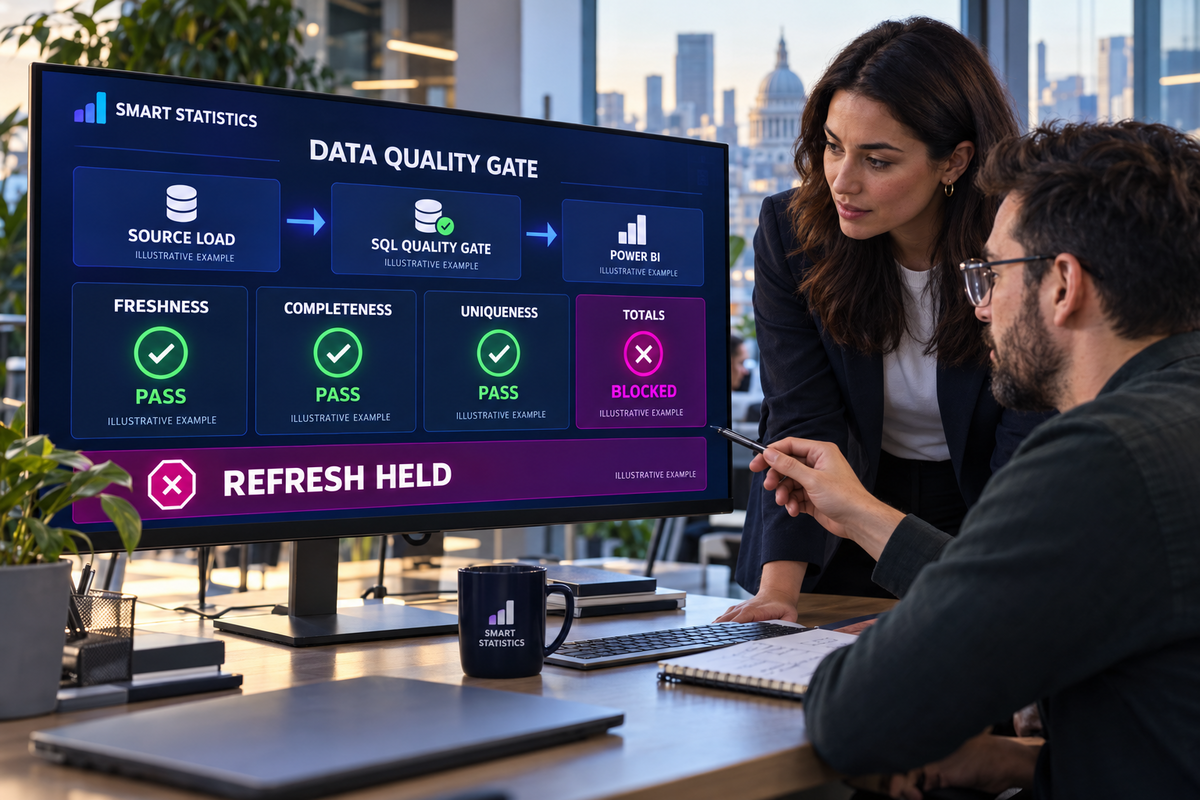
Pre-refresh quality gate
DATA
GATE
HELD
Decision: hold refresh and assign the totals exception to Finance Data Operations.
Illustrative example variance: £12,480.00.
A green refresh icon is not a data-quality certificate
A pipeline can load every row it receives while those rows are late, duplicated, incomplete, orphaned or financially inconsistent. The gate must test the business contract before the reporting model is released.
Technically complete, commercially wrong
The load finishes without an SQL error, but a source extract is missing a region or day. The dashboard publishes a plausible partial result.
Rules live only in people’s heads
An analyst notices unusual totals manually. When that person is absent, the same warning signs do not delay the refresh.
Every defect becomes an outage
Without severity levels, even advisory warnings stop delivery—or critical failures are ignored to keep the report on time.
Define the data contract before writing SQL
Every rule needs a business reason, threshold, severity, accountable owner and response. “Looks unusual” is not executable acceptance logic.
| Rule | Question | Example threshold | Owner | Severity |
|---|---|---|---|---|
| Freshness | Did the expected batch arrive recently enough? | Extract age no more than 180 minutes. | Source-system owner | Blocking |
| Completeness | Are mandatory business fields populated? | No missing invoice, customer or transaction date. | Process owner | Blocking |
| Uniqueness | Is the declared transaction key unique? | Zero excess rows per invoice number. | Data-product owner | Blocking |
| Referential integrity | Does every customer exist in the governed master? | Zero orphan customer keys. | Master-data owner | Blocking |
| Control totals | Does loaded value equal the signed source control? | Absolute variance no more than £0.01. | Finance data owner | Blocking |
| Reasonableness | Is movement outside an agreed operating range? | Flag, but do not stop, change above 35%. | Reporting owner | Warning |
Create persistent evidence tables
Store one row for each gate run and one row for each rule result. This separates operational evidence from the source table being tested.
Create the run and result tables
The following T-SQL targets SQL Server or Azure SQL Database. Review data types, schemas, permissions, indexes and platform compatibility before production use.
CREATE TABLE dbo.QualityRun
(
    RunId                bigint IDENTITY(1,1) PRIMARY KEY,
    BatchId              uniqueidentifier NOT NULL,
    StartedAtUtc         datetime2(0) NOT NULL
        CONSTRAINT DF_QualityRun_StartedAtUtc DEFAULT SYSUTCDATETIME(),
    CompletedAtUtc       datetime2(0) NULL,
    GateStatus           varchar(12) NOT NULL,
    BlockingFailureCount int NOT NULL CONSTRAINT DF_QualityRun_Failures DEFAULT 0,
    ErrorMessage         nvarchar(2048) NULL
);

CREATE TABLE dbo.QualityResult
(
    ResultId       bigint IDENTITY(1,1) PRIMARY KEY,
    RunId          bigint NOT NULL,
    RuleCode       varchar(50) NOT NULL,
    RuleName       nvarchar(200) NOT NULL,
    Severity       varchar(10) NOT NULL,
    Passed         bit NOT NULL,
    FailedRowCount bigint NOT NULL,
    ObservedValue  nvarchar(200) NULL,
    TestedAtUtc    datetime2(0) NOT NULL
        CONSTRAINT DF_QualityResult_TestedAtUtc DEFAULT SYSUTCDATETIME(),
    CONSTRAINT FK_QualityResult_QualityRun
        FOREIGN KEY (RunId) REFERENCES dbo.QualityRun(RunId)
);

CREATE INDEX IX_QualityResult_RunId
    ON dbo.QualityResult(RunId, Severity, Passed);
Give each batch a control record
The gate needs an independent expectation. Otherwise, comparing a loaded table with itself can confirm an incomplete batch.
Capture source-supplied control information
CREATE TABLE dbo.SalesBatchControl
(
    BatchId          uniqueidentifier PRIMARY KEY,
    ExtractedAtUtc   datetime2(0) NOT NULL,
    ExpectedRowCount bigint NOT NULL,
    ExpectedAmount   decimal(19,4) NOT NULL,
    ApprovedBy       nvarchar(150) NULL
);

-- Simplified staging structure used by the tutorial.
CREATE TABLE dbo.SalesStage
(
    BatchId       uniqueidentifier NOT NULL,
    InvoiceNumber nvarchar(50) NULL,
    CustomerId    int NULL,
    InvoiceDate   date NULL,
    NetAmount     decimal(19,4) NULL,
    LoadedAtUtc   datetime2(0) NOT NULL
        CONSTRAINT DF_SalesStage_LoadedAtUtc DEFAULT SYSUTCDATETIME()
);

CREATE INDEX IX_SalesStage_BatchInvoice
    ON dbo.SalesStage(BatchId, InvoiceNumber);
Populate SalesBatchControl from a trusted manifest, source-system control table or independently signed extract—not from an aggregation of SalesStage.
The later referential-integrity rule assumes an existing governed dbo.Customer master table with a unique CustomerId.
Execute the rules and persist every result
The procedure below calculates five blocking checks, stores their results and raises an exception when any blocking rule fails.
Create the quality-gate procedure
CREATE OR ALTER PROCEDURE dbo.usp_RunSalesQualityGate
    @BatchId uniqueidentifier,
    @MaxAgeMinutes int = 180,
    @AmountTolerance decimal(19,4) = 0.01
AS
BEGIN
    SET NOCOUNT ON;
    SET XACT_ABORT ON;

    DECLARE
        @RunId bigint,
        @ExpectedRows bigint,
        @ActualRows bigint,
        @ExpectedAmount decimal(19,4),
        @ActualAmount decimal(19,4),
        @ExtractedAtUtc datetime2(0),
        @MissingMandatory bigint,
        @DuplicateRows bigint,
        @OrphanCustomers bigint,
        @BlockingFailures int;

    DECLARE @Results TABLE
    (
        RuleCode varchar(50),
        RuleName nvarchar(200),
        Severity varchar(10),
        Passed bit,
        FailedRowCount bigint,
        ObservedValue nvarchar(200)
    );

    BEGIN TRY
        INSERT dbo.QualityRun (BatchId, GateStatus)
        VALUES (@BatchId, 'Running');

        SET @RunId = SCOPE_IDENTITY();

        SELECT
            @ExpectedRows = ExpectedRowCount,
            @ExpectedAmount = ExpectedAmount,
            @ExtractedAtUtc = ExtractedAtUtc
        FROM dbo.SalesBatchControl
        WHERE BatchId = @BatchId;

        IF @ExpectedRows IS NULL
            THROW 51000, 'No trusted control record exists for this batch.', 1;

        SELECT
            @ActualRows = COUNT_BIG(*),
            @ActualAmount = COALESCE(SUM(NetAmount), 0)
        FROM dbo.SalesStage
        WHERE BatchId = @BatchId;

        SELECT @MissingMandatory = COUNT_BIG(*)
        FROM dbo.SalesStage
        WHERE BatchId = @BatchId
          AND (
              NULLIF(LTRIM(RTRIM(InvoiceNumber)), '') IS NULL
              OR CustomerId IS NULL
              OR InvoiceDate IS NULL
              OR NetAmount IS NULL
          );

        SELECT @DuplicateRows = COALESCE(SUM(ExcessRows), 0)
        FROM
        (
            SELECT COUNT_BIG(*) - 1 AS ExcessRows
            FROM dbo.SalesStage
            WHERE BatchId = @BatchId
              AND InvoiceNumber IS NOT NULL
            GROUP BY InvoiceNumber
            HAVING COUNT_BIG(*) > 1
        ) AS Duplicates;

        SELECT @OrphanCustomers = COUNT_BIG(*)
        FROM dbo.SalesStage AS S
        LEFT JOIN dbo.Customer AS C
          ON C.CustomerId = S.CustomerId
        WHERE S.BatchId = @BatchId
          AND S.CustomerId IS NOT NULL
          AND C.CustomerId IS NULL;

        INSERT @Results VALUES
        (
            'FRESHNESS', 'Source extract is within the agreed age', 'Blocking',
            IIF(
                DATEDIFF(minute, @ExtractedAtUtc, SYSUTCDATETIME())
                    BETWEEN 0 AND @MaxAgeMinutes,
                1, 0
            ),
            IIF(
                DATEDIFF(minute, @ExtractedAtUtc, SYSUTCDATETIME())
                    BETWEEN 0 AND @MaxAgeMinutes,
                0, 1
            ),
            CONCAT(DATEDIFF(minute, @ExtractedAtUtc, SYSUTCDATETIME()), ' minutes old')
        ),
        (
            'COMPLETENESS', 'Mandatory sales fields are populated', 'Blocking',
            IIF(@MissingMandatory = 0, 1, 0), @MissingMandatory,
            CONCAT(@MissingMandatory, ' incomplete rows')
        ),
        (
            'UNIQUENESS', 'Invoice number is unique within the batch', 'Blocking',
            IIF(@DuplicateRows = 0, 1, 0), @DuplicateRows,
            CONCAT(@DuplicateRows, ' excess duplicate rows')
        ),
        (
            'CUSTOMER_KEY', 'Every customer exists in the master table', 'Blocking',
            IIF(@OrphanCustomers = 0, 1, 0), @OrphanCustomers,
            CONCAT(@OrphanCustomers, ' orphan customer rows')
        ),
        (
            'CONTROL_TOTAL', 'Row count and amount agree to source controls', 'Blocking',
            IIF(
                @ActualRows = @ExpectedRows
                AND ABS(@ActualAmount - @ExpectedAmount) <= @AmountTolerance,
                1, 0
            ),
            IIF(@ActualRows = @ExpectedRows, 0, ABS(@ActualRows - @ExpectedRows)),
            CONCAT(
                'Rows ', @ActualRows, '/', @ExpectedRows,
                '; amount variance ',
                CONVERT(varchar(50), @ActualAmount - @ExpectedAmount)
            )
        );

        INSERT dbo.QualityResult
            (RunId, RuleCode, RuleName, Severity, Passed, FailedRowCount, ObservedValue)
        SELECT
            @RunId, RuleCode, RuleName, Severity, Passed, FailedRowCount, ObservedValue
        FROM @Results;

        SELECT @BlockingFailures = COUNT(*)
        FROM @Results
        WHERE Severity = 'Blocking'
          AND Passed = 0;

        UPDATE dbo.QualityRun
        SET CompletedAtUtc = SYSUTCDATETIME(),
            GateStatus = IIF(@BlockingFailures = 0, 'Passed', 'Blocked'),
            BlockingFailureCount = @BlockingFailures
        WHERE RunId = @RunId;

        IF @BlockingFailures > 0
            THROW 51001, 'Data quality gate blocked the reporting refresh.', 1;

        SELECT RunId, BatchId, GateStatus, BlockingFailureCount
        FROM dbo.QualityRun
        WHERE RunId = @RunId;
    END TRY
    BEGIN CATCH
        IF @RunId IS NOT NULL
        BEGIN
            UPDATE dbo.QualityRun
            SET CompletedAtUtc = COALESCE(CompletedAtUtc, SYSUTCDATETIME()),
                GateStatus = CASE WHEN GateStatus = 'Blocked' THEN GateStatus ELSE 'Error' END,
                ErrorMessage = ERROR_MESSAGE()
            WHERE RunId = @RunId;
        END;

        THROW;
    END CATCH;
END;THROW raises an exception and transfers execution to a CATCH block when used inside TRY...CATCH. Your orchestrator can therefore treat a blocked gate as a failed activity while the result tables retain the business evidence.
Test the gate with a known bad batch
Do not wait for production failure. Prove that each rule passes clean data and blocks its intended defect without suppressing unrelated warnings.
Run the procedure
DECLARE @BatchId uniqueidentifier =
    'A8D9F557-7175-4D4A-96B6-19D71D097CF4';

EXEC dbo.usp_RunSalesQualityGate
    @BatchId = @BatchId,
    @MaxAgeMinutes = 180,
    @AmountTolerance = 0.01;
Test separate fixtures for a late extract, missing invoice number, duplicate key, orphan customer and total mismatch. Include a clean control batch.
Read the evidence
SELECT
    R.RunId,
    R.BatchId,
    R.GateStatus,
    R.StartedAtUtc,
    Q.RuleCode,
    Q.Severity,
    Q.Passed,
    Q.FailedRowCount,
    Q.ObservedValue
FROM dbo.QualityRun AS R
JOIN dbo.QualityResult AS Q
  ON Q.RunId = R.RunId
WHERE R.BatchId =
    'A8D9F557-7175-4D4A-96B6-19D71D097CF4'
ORDER BY R.RunId DESC, Q.ResultId;
Expose this history to operational monitoring, but restrict sensitive row-level exceptions to authorised investigators.
Put the gate before the Power BI refresh
The workflow should have an explicit success route, a controlled failure route and no path that refreshes the semantic model after an unresolved blocking result.
Run and evaluate
After staging completes, execute the quality procedure for the exact batch or partition intended for release. Pass the batch identifier explicitly.
Block and notify
On SQL failure, stop the release path. Notify the named owner with batch, rule, observed value, evidence link and agreed response deadline.
Refresh only on success
On gate success, invoke the semantic-model refresh. In Fabric Data Factory, the semantic model refresh activity can form the next success-dependent activity; other orchestrators can use the Power BI REST API with approved authentication and permissions.
Separate warnings, blockers and overrides
Not every unusual value is wrong. Severity should reflect the decision risk and whether the organisation can safely publish while an issue is investigated.
| Class | Effect | Typical use | Evidence |
|---|---|---|---|
| Blocking | Refresh does not start. | Missing batch, duplicate transaction keys, failed financial controls, unauthorised scope. | Rule result, affected count or value, owner and resolution. |
| Warning | Refresh may proceed while an alert is raised. | Unusual but plausible movement, optional attributes, emerging trend breaches. | Observed value, reviewer, monitoring window and escalation point. |
| Override | Named authority releases a blocked batch exceptionally. | Time-critical reporting where impact is understood and disclosed. | Approver, reason, expiry, affected reports, user communication and remediation ticket. |
| Retired | Rule no longer executes. | Source or process changed and the control is no longer relevant. | Decision date, owner, replacement control and retained history. |
Assign ownership across the full control
The SQL developer owns implementation quality, but the business must own what “acceptable data” means.
Data owner
Approves critical fields, totals, thresholds, severity and exceptional release decisions.
System owner
Explains missing or late extracts, fixes upstream defects and confirms restoration.
Product owner
Owns the gate, evidence model, release workflow, regression tests and support boundary.
Report owner
Understands affected measures, communicates impact and confirms whether users need a caveat.
Choose the right control location
Place the rule where it can prevent the defect most reliably and where an accountable team can maintain it.
| Situation | Best starting point | Reason |
|---|---|---|
| Invalid entry can be prevented | Source application or database constraint. | Stop the defect closest to creation rather than repeatedly detecting it downstream. |
| Several reports reuse the same curated table | SQL or governed platform layer. | One shared gate protects every downstream consumer and retains central evidence. |
| Rule is specific to one semantic definition | Transformation or semantic-model test. | Keep report-specific acceptance logic with the product it protects. |
| Small analyst-owned prototype | Power Query profiling plus documented manual review. | Prove value before building operational infrastructure, while retaining release checks. |
| Real-time or high-volume processing | Streaming or pipeline-native validation. | A batch stored procedure may not meet latency, scale or quarantine requirements. |
Measure whether the gate improves reporting
A quality gate creates value when it reduces user exposure and speeds resolution—not simply because more rules exist.
Control measures
Track pass rate, blocking failures by rule, warning rate, aged failures, overrides, repeat failures, test execution time, false positives and batches without an independent control record.
Segment by source and business criticality so a high pass rate in low-risk feeds does not hide instability in an executive dataset.
Business measures
Track incorrect reports prevented, time from detection to resolution, refresh delay, post-publication corrections, analyst investigation time and users affected by disclosed defects.
Compare the cost of controlled delay with the impact of publishing a known wrong number.
Is your pre-refresh gate production-ready?
Select only controls supported by current evidence. Any missing critical item keeps the result at high priority.
Frequently asked questions
Should every data-quality failure stop Power BI refresh?
No. Block failures that make the intended decision unsafe or breach an agreed data contract. Route unusual but usable values as warnings, with an owner and escalation threshold.
Why store quality results instead of only throwing an SQL error?
An exception controls workflow, but persistent results explain which rule failed, what was observed and whether the problem repeats. That evidence supports investigation, governance and improvement.
Can this pattern be used with Microsoft Fabric?
The pattern can be adapted to Fabric, but confirm each T-SQL feature against the current endpoint and use the platform’s supported orchestration activities. Fabric Data Factory includes a semantic model refresh activity for pipeline-driven refresh.
What happens when the quality gate itself errors?
Treat an unhandled gate error as a blocked release, retain the error message, alert the technical owner and do not assume the data passed. A control that did not complete cannot provide positive assurance.
Stop unreliable data before it becomes a trusted dashboard
Smart Statistics helps UK organisations design practical data-quality controls, governed reporting pipelines and Power BI solutions that make failures visible before users act on them.